Is the Rog Swift Oled Pg34Wcdm Still Good in 2026? Long-Term Review
I've been using the ROG Swift OLED PG34WCDM as my primary monitor for several months, and I wanted to write a long-term review that doesn't gloss over the real-world tradeoffs. When I bought this monitor I was chasing the promise of ultrawide OLED: perfect blacks, punchy HDR, and the responsiveness you expect from a gaming display. After months of daily work, content creation, and late-night gaming sessions, what I found was a mix of delight, small annoyances, and a few durability questions that matter if you're buying in 2026.
Quick summary of my experience
In my experience the PG34WCDM delivers one of the most cinematic ultrawide experiences you can get from a single panel. The contrast and perceived color depth remain the standout features; text looks crisp, HDR scenes pop, and games feel "alive" in a way LCDs rarely achieve. That said, there are practical considerations—brightness management, windowed workflow limitations, and a lingering concern about long-term OLED wear if you use static UI elements for many hours a day. For me, the benefits still outweigh the drawbacks, but it's not a no-brainer for every buyer.
What I tested it for
To give you a useful picture, I used the PG34WCDM in mixed-real-world scenarios over roughly half a year:
- Daily productivity: multiple browser tabs, Slack, code editor, and long spreadsheets.
- Content creation: photo editing in Lightroom, color-grading clips, casual video timelines.
- Gaming: competitive FPS, open-world RPGs, and racing sims (both single-player and online).
- Media consumption: streaming HDR movies and watching a variety of SDR content.
Design, build and ergonomics
The monitor feels solid on the desk. The stand provides height, tilt, and swivel with a reassuring amount of tension; I didn't feel the need to replace it with a third-party arm. The curve is gentle and appropriate for a 34-inch ultrawide — immersive without being disorienting. The bezel is slim on three sides, which I appreciated for a near-seamless multi-monitor setup (though I mostly ran it solo).
Ports are adequate for my use: DisplayPort and multiple HDMI inputs, a few USB-A ports, and an audio output. The OSD is typical of ROG monitors—feature-rich but a little menu-heavy when you want to quickly change settings. One practical gripe: the joystick control takes a few presses to get used to, and the labeling in the menu could be clearer for some advanced HDR settings.
Image quality and color
OLED’s signature trait—absolute black—is what initially sold me, and it still impresses. Dark scenes in games and movies have depth that no IPS/VA backlight can match. For color, I noticed that skin tones and saturated colors feel more "real" compared to my previous IPS ultrawide. Out of the box the panel leaned a touch warm; after a quick calibration to my target workflow (I aimed for around 120 cd/m² and D65), colors were accurate enough for most photo work, though pro colorists will still want hardware profiling.
Uniformity has been very good in my unit. I saw no distracting vignetting or tint shifts across the panel during normal use. There were very slight variations on extreme full-screen gray fills, but nothing noticeable in real content. HDR is where the monitor shines in subjective terms—specular highlights on water, neon signs, and bright particle effects in games look spectacular because of OLED’s pixel-level contrast.
Motion, input lag, and gaming feel
I play a mix of competitive and immersive games, and the PG34WCDM felt excellent. Motion clarity is strong, and the panel's responsiveness keeps input latency unobtrusive; I didn't notice a meaningful disadvantage compared to high-refresh IPS panels in my typical matchplay. Fast camera pans in racing and flight sims stayed crisp; I only saw minor trailing with the most aggressive motion blur settings enabled (which I turned off).
Shop the latest Electronics picks on Amazon.
View Offers →One subtle point: some game HUDs and static overlays can look slightly softer than the rest of the scene, an artifact of tone mapping when HDR is active. Switching to SDR or adjusting the game's HDR options resolved it in most cases, but it's something I had to tweak for consistent clarity in competitive play.
HDR experience and brightness
OLED's contrast makes HDR content feel much more convincing than on most SDR monitors. Highlights feel distinct and detailed rather than just a brighter wash. That said, absolute peak brightness on this OLED still can't match the brightest mini-LED or high-end LCDs. On HDR-heavy scenes where specular highlight clipping is used creatively, I still appreciated the way the PG34WCDM rendered detail, but in very bright rooms the perceived HDR punch is reduced.
For my ambient conditions—which are moderate and controllable—HDR was transformative for movies and single-player games. For a brightly lit competitive gaming r…
Burn-in and long-term wear (my main concern)
This is the question I get asked most. OLED and long-term static UI elements are a real concern, and I treated the monitor with that in mind from day one. I used the following practical measures:
- Kept default brightness reasonably low for prolonged work sessions (targeting ~120 cd/m² for text work).
- Enabled pixel refresh/compensation cycles when the monitor suggested them.
- Avoided prolonged static content at full brightness; I moved panels around when I used apps with persistent HUDs for hours.
After months I noticed very mild, faint retention on extremely repetitive static patterns (for example, the static HUD of a particular racing sim left a ghost for an hour or two after long practice sessions) but it faded after normal use and the monitor's compensation routines. I haven't seen permanent burn-in on my unit. That said, I believe the risk is not zero—if you run very static UIs at maximum brightness 8+ hours daily, you increase the chance of permanent image retention over years.
Practical annoyances and small disappointments
One thing that bothered me was menu-driven HDR behavior in some games: depending on the title and platform, switching HDR could require a brief system/driver restart to get the scaling right. Also, when using multiple inputs with mixed resolutions and color formats, I had to adjust color space options manually more than I expected. The software utilities provided are useful but occasionally quirky on Windows updates.
I also noticed that wallpapers and some static dashboards could develop a slight "memory" impression if left untouched for many hours at high brightness—again, not a full burn-in but a reminder to avoid permanently static elements.
Shop the latest Electronics picks on Amazon.
Browse Now →Who should buy the PG34WCDM in 2026?
In my experience this monitor is best for someone who values cinematic image quality and immersive ultrawide gaming, and who is willing to adopt reasonable habits to mitigate OLED wear. If you spend the majority of your day in productivity apps with static toolbars at maximum brightness, you may want to consider an LCD alternative. If your use is mixed—creative work, movie watching, and gaming—the PG34WCDM offers a very compelling overall experience.
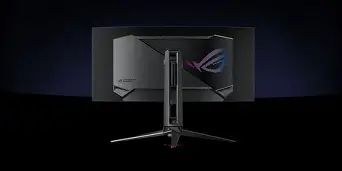
Pros & Cons
- Pros:
- Outstanding black levels and contrast — OLED's best strengths are on full display here.
- Excellent color vibrancy and perceived depth for games and movies.
- Immersive ultrawide form factor that enhances both productivity and single-player gaming.
- Responsive enough for competitive play with low subjective input lag.
- Solid build quality and an adjustable stand that covers common ergonomic needs.
- Cons:
- OLED wear/retention is a real long-term consideration—requires conscious brightness and usage habits.
- Peak HDR brightness is impressive for OLED but still falls short of top mini-LED LCDs in very bright rooms.
- OSD and software controls can be fiddly; switching inputs or toggling HDR can require extra steps.
- Small chance of faint temporary retention after very long static sessions at high brightness.
Comparison: PG34WCDM vs typical 34" IPS 144Hz vs a 27" OLED (overview)
| Category | ROG Swift OLED PG34WCDM | 34" IPS 144Hz (typical) | 27" OLED (typical) |
|---|---|---|---|
| Black levels / contrast | Best — true blacks and high perceived contrast | Good, but black floor is lifted | Excellent, similar to PG34WCDM but smaller immersion |
| Color / vibrancy | Punchy, great for HDR and creative work | Accurate when high-quality IPS; less pop than OLED | Very vibrant; ideal for color work but less workspace |
| Refresh / gaming | High refresh and responsive for most gamers | Often excellent for competitive gaming (high Hz) | Excellent; low latency, smaller size helps competitive sightlines |
| Brightness / HDR peak | Very good for OLED but lower than mini-LED LCDs | Can reach higher peaks on HDR-capable models | Similar OLED peak limitations |
| Risk of burn-in | Medium — requires mindful use | Very low | Medium — same OLED considerations |
| Workspace / productivity | Excellent — wide real estate for multitasking | Excellent | Smaller workspace, trades size for pixel density |
Buying guide: what to check before you buy (my practical checklist)
If you're considering the PG34WCDM in 2026, here are the things I looked for and that I recommend you check:
- Unit condition and warranty: Make sure the seller or retailer offers a clear warranty that covers panel defects and image retention. That provided me peace of mind.
- Return policy: Test the unit in your room for uniformity and retention during the return window. If you can, run mixed content: text-heavy work and several long gaming sessions to see if anything bothers you.
- Use-case fit: If you do long hours of static UI work at peak brightness (e.g., trading screens, long dashboards), consider an LCD instead. If you alternate between content creation, movies, and gaming, OLED is a strong match.
- Calibrations and presets: Check whether the monitor has sensible SDR/HDR presets and if it supports hardware calibration. I found that minor tweaks made a big difference.
- Input/ports: Verify the monitor has the ports and sync support you need for your GPU and consoles. Also confirm refresh rate compatibility over your preferred cable (DisplayPort vs HDMI).
- Brightness needs and ambient light: If your room is very bright, test the monitor in those conditions—OLED's beauty can be diminished by glare and not having high nit peaks like some LCDs.
- Plan for maintenance: Use built-in pixel refresh tools, and occasionally vary content to avoid prolonged static UI exposure at maximum brightness.
Final thoughts and conclusion
After months with the ROG Swift OLED PG34WCDM, what I found was a monitor that continues to excite me. Its strength is the visceral quality of the image: perfect blacks, stunning HDR feel in dim to moderate rooms, and an ultrawide canvas that genuinely improves immersion. For movies, single-player games, and color-sensitive creative work I reached for it without hesitation.
That said, perfection comes with caveats. The practical reality of OLED means you need to be mindful about brightness and static content. I didn't experience permanent burn-in, but I did notice temporary retention on extreme, repetitive use patterns—which faded. In 2026, if you want the best-looking ultrawide OLED experience and are comfortable with a few usage habits to protect the panel, I think the PG34WCDM is still a strong choice. If your workflow is heavily static and brightness-critical or you need the absolute brightest HDR peaks for well-lit rooms, a high-end mini-LED LCD may serve you better.
Overall, my recommendation after real use is this: buy the PG34WCDM if you prioritize image quality, immersion, and cinematic contrast—and be prepared to treat the panel with the mild respect OLED deserves. For me, having lived with it daily for months, it's remained one of the most satisfying display upgrades I've used in years.